SpamTitan & SPF Records

spamtitan-logo

As many of you know, we offer a paid business class spam filtering option called SpamTitan. You may not know, however, that whether or not you pay for inbound SpamTitan filtering all of your outbound email is still filtered by our SpamTitan cluster. If you aren’t familiar with our SpamTitan filtering you can learn more about it or signup for a free trial here.

We began filtering all outbound email through our SpamTitan cluster back in 2012 because we knew how important email delivery was to our clients. Since then we’ve experienced very few issues with our outbound mail IP addresses getting black listed or having a less than excellent reputation.

The vast majority of our outbound spam comes from forwarders that clients have setup to forward their domain’s email to their Gmail or other third party account. The filtering stops a lot of these spam messages from being forwarded and negatively impacting our IP reputation. Occasionally we do also see an email account’s login information having been compromised and used to send spam via SMTP and SpamTitan is able to stop most of these messages from ever leaving our network. Continue reading

Security Update Roundup

There are many aspects to securing a website but one the easiest and most important things you can do is to stay on top of script updates as they become available. Our clients are generally pretty good about doing this but mistakes do happen. Attackers exploiting old, vulnerable scripts is by far the number one reason that we see sites being compromised. Cleaning a site once a compromise has already occurred can be a costly and time consuming process. Being proactive and keeping everything patched in a timely manner is far easier and significantly reduces the chance that your site will be compromised.

wordpress-logo-stacked-rgb

Popular scripts like WordPress have a very easy update process that can be run from within the administrative interface and be completed with just a couple of clicks. You can also configure your WordPress instances for automatic updates which can even take care of your plugins and themes as well. Another option is to configure Softaculous to automatically handle these for you. If you install a script using Softaculous this is very easy to do from their cPanel interface. Continue reading

SpamTitan Status Update & Free Trial

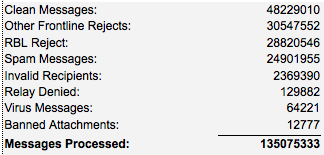
It has been almost a year since our last SpamTitan status update and since then the number of emails that our SpamTitan cluster has processed has nearly doubled. To date our cluster has now examined over 135 million emails as can be seen from the chart below.

2015-04-07-spamtitan-chart

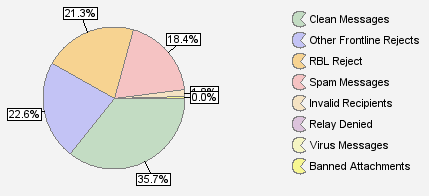
The overall percentage of clean messages has dropped from 36.8% to 35.7%. This indicates an even greater percentage of change over the past 11 months since these percentages take into account all of the messages that have been filtered to date.

2015-04-07-spamtitan-graph

If you compare this latest graph to the one prior you’ll also notice a reduction in RBL rejections. This is just a symptom of the messages being tagged as spam earlier in the filtering process because you can also see an increase in other front line rejections (SPF, HELO verification,  greylisting, etc.). Messages filtered out at this stage would never get to the RBL rejection stage. Continue reading

cPanel 11.48 & Paper Lantern

Last week cPanel 11.48 made its way to the stable release tier and after some internal testing here all of our servers were updated with this new version. This new version brings some cPanel related changes including a nice new Paper Lantern theme for webmail. While the cPanel changes may seem relatively minor they will prove to be very useful for many of you.

In the past, the maximum email account quota that you could set was 2GB. If you wanted to set a higher limit the only option was to use “unlimited” which isn’t ideal. With this update, you can now configure email account quotas up to 4TB in size on our servers. Below you can see a 4GB test account we created that wasn’t previously possible.

cPanel Email Quota Limits

Important additions have also been made to the cPanel user contact preferences. cPanel users are now able to receive notifications whenever their contact email or account’s password changes. This provides some peace of mind knowing that you will be alerted if these are ever changed. Continue reading

Adobe Flash & GHOST: Critical glibc Vulnerability

flash logo

Lately it seems there has been no shortage of critical vulnerabilities being discovered in commonly used software. In the past couple of weeks alone, Adobe has had to release patched versions of Flash to address a trio of publicized zero day vulnerabilities. While as a host that doesn’t really impact us directly, it should be a top priority for anyone browsing the web. The vast majority of end-user computer infections come from malicious content taking advantage of such vulnerabilities. These can often lead to your login information being compromised which certainly does become an issue for us. As always, please be sure you’re staying up-to-date with these Flash patches as well as those for your operating system, web browser, Java, etc. Continue reading

Happy New Year!

We wanted to quickly wish everyone a very happy and prosperous new year! 2014 was a busy year for us as we deployed a new SpamTitan node, migrated all of our off-site servers, deployed a redundant VPN server, and defended against Heartbleed, ShellshockPOODLE, and a critical Drupal vulnerability.maxresdefault

We expect to be just as busy during 2015 as we continue to further enhance our services to better serve our clients. One of the big things we are in the process of planning is the migration of all hosting servers to brand new hardware. Despite the fact that our servers are still very capable and able to handle anything we throw at them, we like to do a full hardware refresh every few years. This helps us make sure your hosting performs flawlessly and likewise helps us avoid hardware failure rates that inevitably increase as time goes on. Stay tuned for another exciting year here at Dathorn!

Behind the Scenes: POODLE SSLv3 & Network Speedtest

As you may have heard, in October a new vulnerability was disclosed in SSL version 3 that was dubbed POODLE (Padding Oracle On Downgraded Legacy Encryption). This allowed an attacker to read SSLv3 encrypted data via a man-in-the-middle attack. It has long been standard to disable SSLv2 and as a result of this new disclosure many providers, including us, have opted to disable SSLv3 as well. Disabling SSLv3 was really long overdue anyways and only used for legacy support of older operating systems that have long reached their end of life, such as initial releases of Windows XP. Any recent OS or software will instead use a version of TLS to connect which is now the only option that our servers permit. Aside from a couple of very minor cipher issues which were quickly remedied, we’ve experienced no problems with the deployment of these changes back in October. Ultimately this is just another small part that shows our ongoing commitment to security here at Dathorn, where keeping your data safe and secure is a priority.

Screen Shot 2014-10-15 at 10.53.07 AMIn other unrelated news, we have added network performance testing information to our network page. We frequently receive requests for information on how to test our network connectivity from a client’s location. To help make this process easier we’ve added this information directly to our website and have even setup a speedtest there. The image above shows some sample results from my own cable connection at home. Does anyone with Google fiber want to show off a bit?

Drupal SQL Injection Vulnerability – CVE-2014-3704

drupal_logo-blue

On October 15th a very serious SQL injection vulnerability was discovered in Drupal that exists in all 7.x versions prior to 7.32. The severity of this vulnerability led to quick exploitation of it within approximately 7 hours of it having been publicized. Fortunately the provided patch to address this issue was quite simple and easy to apply. In fact, the patch only changed one line of code in the includes/database/database.inc file. Because of this we opted to go ahead and pro-actively apply the patch to all installations of Drupal 7.x on our servers. In less than an hour we had protected all of our clients’ Drupal installations from being exploited by this vulnerability. Beyond that it helped to protect our servers from attackers that were exploiting this vulnerability to run other malicious scripts. Affected clients should still upgrade their Drupal to the latest version as soon as possible.

Overall we were very pleased that this was so easily addressed on our end and we will certainly look into options like this going forward as new vulnerabilities in popular scripts are discovered. This incident shows how important it is for you to stay on top of script, plugin, and theme updates. Within a mere 7 hours of publicizing this vulnerability, it was being actively exploited. We highly recommend that you sign up for security related mailing lists for the scripts that you are using if they are available. This will give you the best chance at protecting yourself when (not if) a vulnerability like this comes to light.

Behind the Scenes: Shellshock & PHP 5.4

Here’s another quick update on what’s been going on here behind the scenes at Dathorn. As you may have heard, critical bugs were discovered in the popular Linux shell, bash. This event, dubbed “Shellshock”, started to publicly unfold about two weeks ago.

shellshock-bugThe details of these vulnerabilities can be a bit difficult to follow given the number of different patches that were posted. It even required a few quick, consecutive updates from some Linux distributions just to get it right. It seemed like each time a new patch was released someone else was able to poke holes in it, finding new methods to exploit and turning bash into a bit of swiss cheese. Continue reading

The Importance of Redundant DNS

In a nutshell, the Domain Name System (DNS) acts as a phone book that allows you to easily find the IP address that is associated with a particular domain. For example, it is much easier to remember “example.com” than it is “93.184.216.119” (IPv4) or even “2606:2800:220:6d:26bf:1447:1097:aa7” (IPv6). This is critical functionality that every internet user depends on, often without even realizing it. DNS is likewise a critical part of any hosting provider’s services. It does little good if your web servers and email servers are online if your DNS servers are not. Your domain will not be functional.

Domain names and internet concept

It is for this reason that we provide a geographically redundant DNS cluster for all of our clients to use. In the past it was common for all of a domain’s services (web, email, etc.) to be hosted on a single server. As such, it didn’t matter too much if the DNS was also hosted on this same single server because it was largely a case of it all being online or not. Today, though, it is very common for users to host their websites, email, and other services in different places. The most common, of course, is hosting email off site with Google (Gmail) or another such provider. If you’re using a hosting provider that hosts DNS on the same server as your website, then you will lose all services if your website goes down since the DNS will not function. This is why it is important to host DNS separately and redundantly such that an outage like this does not occur. This prevents a website outage from turning into a complete domain outage. Continue reading